The Global Language of Business
Contact ushvidt omrids af cirkel med hvid pil i midten der peger mod venstre
What are 2D barcodes and GS1 Digital Link?

The traditional 1D barcode - such as the EAN-13 barcode you know from retail products - has for decades made it possible to identify goods quickly and uniquely.

With 2D barcodes the barcode can hold more information and be used for more purposes.

A GTIN can, for example, be combined with a batch number, best-before date, and/or serial number. With GS1 Digital Link the product's identification can also be connected to online information.

This provides new opportunities for consumers, businesses, and trading partners alike.

What is a 2D barcode?

A 2D barcode stores information both horizontally and vertically. Unlike a traditional 1D barcode, a 2D barcode can therefore hold more information - such as a GTIN, batch number, expiration date, and/or serial number.

What is GS1 Digital Link?

GS1 Digital Link is a standard that makes it possible to connect a product's GS1 identification - typically its GTIN - with digital information via a web address.

A simplified GS1 Digital Link might look like this:

https://id.eksempel.dk/01/05712345678903

Here, /01/indicates that the following digits are the product's GTIN.

When GS1 Digital Link is encoded into a 2D barcode, the product's physical identification can also become the gateway to digital information.

→ Read: How to create a GS1 Digital Link

What types of 2D barcodes might I encounter?

There are several types of 2D barcodes, but in a GS1 context, these three are particularly relevant:

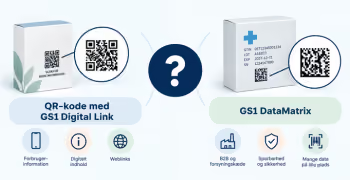
QR code with GS1 Digital Link

Relevant when the product needs to be identified while also providing access to digital information. The QR code can be scanned using the camera on standard smartphones.

GS1 DataMatrix

Relevant when, for example, GTIN, batch number, expiration date, and/or serial number need to be read by a scanner and registered directly into an IT system – such as in production, in the warehouse, or for other processes in the supply chain, the healthcare sector, or retail.

Data Matrix with GS1 Digital Link

Like the QR code, it contains a GS1 Digital Link and can therefore provide access to digital information. Currently, however, standard smartphone cameras cannot scan a Data Matrix with GS1 Digital Link in the same way they can a QR code with GS1 Digital Link.

Unsure about the difference?

→ Read: Should I use a QR code with GS1 Digital Link or a GS1 DataMatrix?

What can you use 2D barcodes for?

Depending on your needs, 2D barcodes can, for example, help you to:

  • identify products at checkout
  • register batch numbers and best-before dates
  • support traceability
  • provide access to product information and user manuals
  • share documentation and certificates
  • provide information on repair and recycling
  • provide access to campaigns, recipes, and other digital content
  • support information related to The Digital Product Passport.

Start with the need - not the barcode

Ask first: What do we want to achieve?

Does the consumer need access to digital information? Should batch and expiry dates be registered upon scanning? Do you need to support traceability or documentation?

The purpose determines what information the barcode should contain and which type of 2D barcode suits your needs.

Find the guide that fits your needs

Need to choose a 2D barcode type?

→ Read the guide: Should I use a QR code with GS1 Digital Link or a GS1 DataMatrix?

Are you ready for implementation?
→ Read the guide: How to transition from 1D barcodes to 2D barcodes

Do you want to download the guide?

arrow-right-circle
Hent den her

Do you still need help? Reach out to our support team. We are always ready to help.

Har du spørgsmål?
Contact us here

What are 2D barcodes and GS1 Digital Link?

Newest guides

GS1 Trade Packaging ikon - grøn cirkel med  illustration af en åben papkasse
Trade Sync ikon - en lyserød cirkel med en illustration af tre cirkler ovenpå hinanden i en cylinder
Exact ikon - en solgul cirkel med en illustration af et forstørrelsesglas
Image ikon - en lyselilla cirkel med en illustration af et kamera i midten
Transact ikon - en lyseblå cirkel med en illustration af et stykke papir med tekst og en stjerne på
GLN ikon - en orange cirkel med en illustration af et lokationssymbol
Logo til Activate service grøn cirkel med grafik af papir med tekst og check-mærker
GTIN ikon - en grøn cirkel med en illustration af fem lodrette streger som en stregkode
|
Videokamera ikon i en mørkeblå cirkel
Ikon for læsetid - en mørkeblå cirkel med fire horisontale streger der indikerer tekst
 min
How to create weight-variable barcodes and products
Learn how to generate barcode numbers for variable-weight sales units and cases, and how to set up your products correctly in GS1Trade Sync.
This is some text inside of a div block.
GS1 Trade Packaging ikon - grøn cirkel med  illustration af en åben papkasse
Trade Sync ikon - en lyserød cirkel med en illustration af tre cirkler ovenpå hinanden i en cylinder
Exact ikon - en solgul cirkel med en illustration af et forstørrelsesglas
Image ikon - en lyselilla cirkel med en illustration af et kamera i midten
Transact ikon - en lyseblå cirkel med en illustration af et stykke papir med tekst og en stjerne på
GLN ikon - en orange cirkel med en illustration af et lokationssymbol
Logo til Activate service grøn cirkel med grafik af papir med tekst og check-mærker
GTIN ikon - en grøn cirkel med en illustration af fem lodrette streger som en stregkode
|
Videokamera ikon i en mørkeblå cirkel
Ikon for læsetid - en mørkeblå cirkel med fire horisontale streger der indikerer tekst
 min
User guide for 2D barcodes that scan every time
Get the size, placement, light zone, contrast, and print quality right to ensure your 2D barcode scans correctly.
This is some text inside of a div block.
GS1 Trade Packaging ikon - grøn cirkel med  illustration af en åben papkasse
Trade Sync ikon - en lyserød cirkel med en illustration af tre cirkler ovenpå hinanden i en cylinder
Exact ikon - en solgul cirkel med en illustration af et forstørrelsesglas
Image ikon - en lyselilla cirkel med en illustration af et kamera i midten
Transact ikon - en lyseblå cirkel med en illustration af et stykke papir med tekst og en stjerne på
GLN ikon - en orange cirkel med en illustration af et lokationssymbol
Logo til Activate service grøn cirkel med grafik af papir med tekst og check-mærker
GTIN ikon - en grøn cirkel med en illustration af fem lodrette streger som en stregkode
|
Videokamera ikon i en mørkeblå cirkel
Ikon for læsetid - en mørkeblå cirkel med fire horisontale streger der indikerer tekst
 min
How to get started with switching from 1D to 2D barcodes
Get an overview of the key decisions and preparations required when transitioning from traditional 1D barcodes to 2D barcodes.
This is some text inside of a div block.