The Global Language of Business
Contact ushvidt omrids af cirkel med hvid pil i midten der peger mod venstre
2D barcodes for product information and marketing

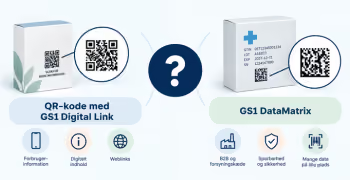
With a QR code with GS1 Digital Link on the packaging, you can give consumers direct access to more information about the product – without needing to fit all that information on the packaging itself.

This could be, for example:

  • product information
  • recipes and inspiration
  • promotions and competitions
  • videos and user guides
  • origin information
  • recycling information

Why use GS1 Digital Link instead of a standard QR code?

A standard QR code can, for example, lead directly to a website or a campaign.

With GS1 Digital Link , the product's GTIN becomes part of the web address. This means the digital connection is based on the product's existing GS1 identification.

This makes it possible to maintain the connection to the same product, even if the digital content changes over time. For example, a QR code can lead to a campaign during one period and later to general product information, without the product's GTIN changing.

Because the GTIN is incorporated, it will be possible to use the same barcode for both digital consumer information and POS scanning. So, when the industry is ready, the QR code with GS1 Digital Link will be able to replace the EAN-13 barcode.

Clarify the purpose before creating the QR code

Before generating your first code, you should answer:

Who will be scanning the code?
Is it primarily for the consumer, or should it also be usable by trading partners and systems?

What should the consumer see after scanning?
For example, product information, a recipe, a user manual, or a campaign?

Who is responsible for the digital content?
Clarify who owns and maintains the domain, links, and content.

Will the barcode also be used at checkout?
If so, this must be factored into your choices, testing, and implementation.

How to get started

1. Define what you want to achieve

Avoid starting with "we need a QR code." Instead, define the desired purpose:

We want to make it easier for the consumer to find recipes.

or:

We want to consolidate product information and user manuals digitally.

2. Start with a few products

Examples of a good first product could be one with:

  • existing digital content
  • high consumer engagement
  • planned packaging changes
  • a specific information challenge.

3. Start with the product's GTIN

The GTIN identifies the product and becomes part of your GS1 Digital Link.

If you do not already have GTINs for your products, you can obtain them by purchasing a GS1ID subscription here: Get started with GTINs

4. Create your GS1 Digital Link

Create a GS1 Digital Link using the product's GTIN and a domain controlled by your company.

For a branded product, it is recommended to use the brand's domain name.

→ Read the guide: How to create a GS1 Digital Link

5. Decide where the scan should lead

Should the consumer land on a product page, a recipe, a user manual, or something else entirely? Choose a destination that can be maintained over time.

6. Test the entire experience

Don't just test whether the QR code can be scanned.

It is also important to test:

  • The mobile experience across different phones and operating systems
  • load time
  • language
  • placement on the packaging
  • size and print quality
  • redirection
  • potential POS scanning (the store's checkout system).

What information should be included in the 2D barcode?

Therefore, only include information that serves a specific purpose. The information to be encoded depends on how the barcode will be used.

→ Read: What information should be encoded in the barcode and what should be digital?

Avoid these common pitfalls

  • The QR code is planned only for the current campaign without considering the product's long-term use.
  • The link points directly to a temporary campaign page.
  • No one is responsible for the link and destination after launch.
  • More information is encoded than necessary.
  • Design changes reduce scannability.
  • The POS (in-store checkout system) and trading partners are being involved too late.

Next steps

→ How to create a GS1 Digital Link

→ What information should be encoded in the barcode and what should be digital?

→ User manual to 2D barcodes that are scanned every time

Do you want to download the guide?

arrow-right-circle
Hent den her

Do you still need help? Reach out to our support team. We are always ready to help.

Har du spørgsmål?
Contact us here

2D barcodes for product information and marketing

Newest guides

GS1 Trade Packaging ikon - grøn cirkel med  illustration af en åben papkasse
Trade Sync ikon - en lyserød cirkel med en illustration af tre cirkler ovenpå hinanden i en cylinder
Exact ikon - en solgul cirkel med en illustration af et forstørrelsesglas
Image ikon - en lyselilla cirkel med en illustration af et kamera i midten
Transact ikon - en lyseblå cirkel med en illustration af et stykke papir med tekst og en stjerne på
GLN ikon - en orange cirkel med en illustration af et lokationssymbol
Logo til Activate service grøn cirkel med grafik af papir med tekst og check-mærker
GTIN ikon - en grøn cirkel med en illustration af fem lodrette streger som en stregkode
|
Videokamera ikon i en mørkeblå cirkel
Ikon for læsetid - en mørkeblå cirkel med fire horisontale streger der indikerer tekst
 min
User guide for 2D barcodes that scan every time
Get the size, placement, light zone, contrast, and print quality right to ensure your 2D barcode scans correctly.
This is some text inside of a div block.
GS1 Trade Packaging ikon - grøn cirkel med  illustration af en åben papkasse
Trade Sync ikon - en lyserød cirkel med en illustration af tre cirkler ovenpå hinanden i en cylinder
Exact ikon - en solgul cirkel med en illustration af et forstørrelsesglas
Image ikon - en lyselilla cirkel med en illustration af et kamera i midten
Transact ikon - en lyseblå cirkel med en illustration af et stykke papir med tekst og en stjerne på
GLN ikon - en orange cirkel med en illustration af et lokationssymbol
Logo til Activate service grøn cirkel med grafik af papir med tekst og check-mærker
GTIN ikon - en grøn cirkel med en illustration af fem lodrette streger som en stregkode
|
Videokamera ikon i en mørkeblå cirkel
Ikon for læsetid - en mørkeblå cirkel med fire horisontale streger der indikerer tekst
 min
How to get started with switching from 1D to 2D barcodes
Get an overview of the key decisions and preparations required when transitioning from traditional 1D barcodes to 2D barcodes.
This is some text inside of a div block.
GS1 Trade Packaging ikon - grøn cirkel med  illustration af en åben papkasse
Trade Sync ikon - en lyserød cirkel med en illustration af tre cirkler ovenpå hinanden i en cylinder
Exact ikon - en solgul cirkel med en illustration af et forstørrelsesglas
Image ikon - en lyselilla cirkel med en illustration af et kamera i midten
Transact ikon - en lyseblå cirkel med en illustration af et stykke papir med tekst og en stjerne på
GLN ikon - en orange cirkel med en illustration af et lokationssymbol
Logo til Activate service grøn cirkel med grafik af papir med tekst og check-mærker
GTIN ikon - en grøn cirkel med en illustration af fem lodrette streger som en stregkode
|
Videokamera ikon i en mørkeblå cirkel
Ikon for læsetid - en mørkeblå cirkel med fire horisontale streger der indikerer tekst
 min
2D barcodes for sustainability and circularity
See how 2D barcodes can provide access to information on topics such as materials, repairs, recycling, and sorting.
This is some text inside of a div block.