|


GTIN
Colloquially, many know GTIN as a barcode, but technically, GTIN is the number found beneath the barcode symbol itself, and can therefore also be used for other technologies such as 2D barcodes and RFID tags.
Colloquially, many know GTIN as a barcode, but technically, GTIN is the number found beneath the barcode symbol itself, and can therefore also be used for other technologies such as 2D barcodes and RFID tags.
Keep the barcode simple - and the information flexible
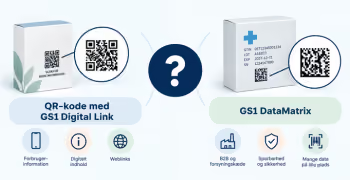
A 2D barcode can contain both structured data that a scanner can transfer directly to an IT system and provide access to digital content via a web address. These are two different applications that must be planned separately.
Data in the barcode is used for identification and machine processing.
Digital content resides outside the barcode and is retrieved via the web.
In some cases, a piece of information may appear in both places, but it serves different purposes: the encoded information can be processed automatically, while the digital version can be displayed, explained, and updated.
Important: Access to digital content requires the 2D barcode to contain a web address. GS1 DataMatrix uses GS1 element string syntax and does not contain a web link. If the product needs to lead a user to digital content, a 2D barcode with GS1 Digital Link must be used, for example a QR code with GS1 Digital Link.
Only encode data when it needs to be readable by scanning and registered or processed directly in an IT system. Each data element should have a specific business or regulatory purpose.
GTIN identifies the product/trade item and is indicated by Application Identifier (01).
Then clarify how precisely the product needs to be identified: as a product type, as a specific production batch, or as an individual unit.
Please note: If the barcode contains information that varies, e.g., batch number, serial number, or dates, the barcode must be changed when the information changes.
A GS1 Application Identifier (AI) tells the receiving system what type of data follows /01/. The most common examples of data in this context are:
There are also Application Identifiers for, among other things, weight as well as production and logistics information. Only select the data elements that the relevant scanners and IT systems need to use.
Batch numbers can be relevant when you need to:
Dates can be relevant for:
Serial numbers can be relevant when the individual physical unit needs to be identified in connection with:
If the 2D barcode only contains static data, which is the same for all units of the product (such as GTIN), it can typically be pre-printed separately from the production line.
Variable data such as batch or lot numbers, expiration dates, serial numbers, and variable weights, are determined only during production or packaging. A batch number or date may vary between production runs, while a serial number or variable weight may be unique to each individual unit.
When the 2D barcode contains such data, it must be generated and applied as part of the production or packaging process.
The production environment must therefore be able to:
Rule of thumb: Encode data because it needs to be used during scanning—not just because there is space for it.
Digital content is not stored as full documents or text within the barcode. Instead, the barcode contains a web address that provides access to the content. This makes it possible to display extensive information and update it without necessarily having to change the printed barcode.
Digital placement is particularly relevant for information that:
About the product: product description, ingredients, specifications, images, origin.
Usage and safety: user guides, manuals, safety information, videos.
Documentation and legal requirements: certificates, documents, regulatory information, information relevant to The Digital Product Passport.
Sustainability and circularity: materials, repair, recycling, sorting, environmental information.
Inspiration and marketing: recipes, inspiration, campaigns, loyalty, brand content.
In some cases, the same information can be used in multiple ways.
A batch number can be encoded in the barcode using a GS1 Application Identifier, allowing an IT system to register it automatically upon scanning.
The information can simultaneously be used to display digital details about that specific batch. This is relevant in the event of a recall, for example, where a scan can provide information on whether the specific batch is affected and what the user should do.
If an IT system needs to read the information directly, it is not enough to simply display it on a digital product page. The information must also be encoded in the barcode.
If different users (e.g., consumers, trading partners, authorities, repair technicians, or other stakeholders) need access to different information about the same product, a resolver can be useful. A resolver can connect the product identification to the relevant digital resources. This allows the same product to lead to multiple information destinations.
→ Read more: What is a resolver?
Before launching, you should clarify:
Packaging can be in circulation for several years. Therefore, use a domain and a technical solution that the company expects to control in the long term. The link should be working even if the content is moved, a campaign ends, or a technology provider is replaced.
Do you still need help? Reach out to our support team. We are always ready to help.