The Global Language of Business
Contact ushvidt omrids af cirkel med hvid pil i midten der peger mod venstre
Should I use a QR code with GS1 Digital Link or a GS1 DataMatrix?

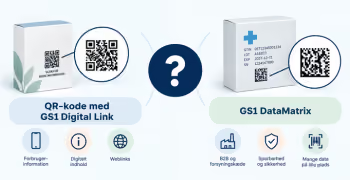
‍QR codes with GS1 Digital Link and GS1 DataMatrix are both 2D barcodes, but they are typically used for different purposes.

A QR code with GS1 Digital Link is ideal when people need to be able to scan with a smartphone and access digital information.
A GS1 DataMatrix is typically used when data from the barcode needs to be read and registered directly into systems and processes.

‍

In short: Which code fits your needs?

Your primary need Typically relevant choice
Consumers need to be able to scan the code with a smartphone QR code with GS1 Digital Link
The product needs to provide access to digital product information, such as user guides, certificates or campaigns QR code with GS1 Digital Link
The GTIN needs to be combined with, for example, a batch number, expiration date or serial number for use in the supply chain GS1 DataMatrix or QR code with GS1 Digital Link
You need a compact 2D barcode for operations, warehousing or logistics GS1 DataMatrix
You operate in healthcare or another regulated sector Often GS1 DataMatrix – depending on applicable requirements
You want to use GS1 Digital Link but have very limited space on the product Data Matrix with GS1 Digital Link may be considered

‍

If you are unsure about which 2D barcode to choose, contact GS1 Denmark before putting the code into production.

‍

Typically choose a QR code with GS1 Digital Link when:

  • consumers or other stakeholders need to be able to scan with a smartphone
  • the scan needs to lead to, for example, product information, user manuals, certificates, or campaigns
  • the product's GTIN – and potentially other information – needs to be part of the link
  • the code will also play a role in the supply chain and needs to be scannable at POS

QR codes with GS1 Digital Link uses GS1 Digital Link URI syntax, meaning it also contains a web address that includes (among other things) the product's GTIN.

→ Read: How to create a GS1 Digital Link.

‍

Typically choose GS1 DataMatrix when:

  • information from the barcode needs to be read by a scanner and registered directly into an IT system
  • there is limited space on the product or packaging
  • GTIN needs to be combined with, for example, a batch number, date, or serial number
  • the code is to be used in a regulated or operational supply chain.

GS1 DataMatrix uses GS1 element string syntax. It therefore does not contain a web address and does not in itself provide direct web access.

‍

What is the difference between GS1 DataMatrix and Data Matrix with GS1 Digital Link?

Terminology is important here: GS1 DataMatrix and Data Matrix with GS1 Digital Link are not the same.

GS1 DataMatrix contains structured data identified using GS1 Application Identifiers. This could be, for example, a GTIN, batch/lot number, and expiration date. The data can be read and used directly in relevant systems, but the symbol itself does not provide access to online content.

Data Matrix with GS1 Digital Link instead contains a web-based GS1 Digital Link URI, where the GTIN and, if applicable, batch/lot and expiration date are included in the URI itself. When the link is opened, the user can be redirected to digital product information.

The principle is the same as for a QR code with GS1 Digital Link. However, Data Matrix is not as widely supported by standard smartphone cameras as QR codes, and may therefore require a specific app to scan the code and open the digital content. For this reason, it is used less frequently.

If you need... Normal choice
Smartphone + web content QR code with GS1 Digital Link
GTIN + batch/date/serial number in operation/logistics GS1 DataMatrix
Digital Link but with very limited space Data Matrix with GS1 Digital Link

Do you want to download the guide?

arrow-right-circle
Hent den her

Do you still need help? Reach out to our support team. We are always ready to help.

Har du spørgsmål?
Contact us here

Should I use a QR code with GS1 Digital Link or a GS1 DataMatrix?

Newest guides

A screenshot of the Excel system and the download icon
GS1Trade Packaging
Trade Sync ikon - en lyserød cirkel med en illustration af tre cirkler ovenpå hinanden i en cylinder
GS1Trade Exact
GS1Trade Image
GS1Trade Transact
GLN
GS1Trade Activate
GTIN
|
Video
Skriftlig vejledning
 min
How to import your data using the Excel template
Learn how to import your product and packaging data using the data import template in Excel.
This is some text inside of a div block.
Person pouring a scoop of protein powder into a container
GS1Trade Packaging
Trade Sync ikon - en lyserød cirkel med en illustration af tre cirkler ovenpå hinanden i en cylinder
GS1Trade Exact
GS1Trade Image
GS1Trade Transact
GLN
GS1Trade Activate
GTIN
|
Video
Skriftlig vejledning
 min
Guide to creating dietary supplements in GS1Trade Sync
Learn more about how to properly register dietary supplements in GS1 according to current requirements for nutrition, dosage and use.
This is some text inside of a div block.
Person holding half a chocolate bar in their hand
GS1Trade Packaging
Trade Sync ikon - en lyserød cirkel med en illustration af tre cirkler ovenpå hinanden i en cylinder
GS1Trade Exact
GS1Trade Image
GS1Trade Transact
GLN
GS1Trade Activate
GTIN
|
Video
Skriftlig vejledning
 min
Guide to creating meal replacements in GS1Trade Sync
Learn more about how meal replacements are correctly registered in GS1 according to current nutrition labeling and reference intake requirements.
This is some text inside of a div block.