|


GTIN
Colloquially, many know GTIN as a barcode, but technically, GTIN is the number found beneath the barcode symbol itself, and can therefore also be used for other technologies such as 2D barcodes and RFID tags.
Colloquially, many know GTIN as a barcode, but technically, GTIN is the number found beneath the barcode symbol itself, and can therefore also be used for other technologies such as 2D barcodes and RFID tags.
It is not enough for your 2D barcode to contain the correct information. It must also have the right size, placement, and print quality to be scanned correctly.
A 2D barcode can, for example, be difficult or impossible to scan if it is too small, poorly printed, placed over a fold, or lacks sufficient clear space around it.
There is no single size that is right for all 2D barcodes.
The required size depends on, among other things:
The specific technical requirements for individual applications can be found in GS1 General Specifications, which is the comprehensive GS1 specification for, among other things, barcode size, placement, and quality.
Use GS1's Size Estimator as a tool to help estimate the size of GS1 2D barcodes for retail.
A 2D barcode must have an empty area around it, free of text, graphics, or other elements. This area is called the quiet zone.
The quiet zone helps the scanner distinguish the barcode from the rest of the packaging design.
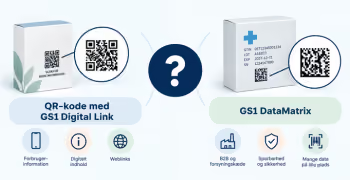
The quiet zone requirement depends on the type of 2D barcode. Therefore, a QR code with GS1 Digital Link and a GS1 DataMatrix do not have the same requirements.
Where should the 2D barcode be placed?
Avoid placement in the following areas whenever possible:
During the transition to 2D, products may feature both the existing EAN-13 barcode and a new 2D barcode on the packaging.
When both barcodes are present on the same packaging, there are specific recommendations for how they should be positioned in relation to each other.
→ Read guide: Placement of the QR codes with GS1 Digital Link
There must be clear contrast between the barcode and the background. A dark barcode on a light background is the safest starting point.
Colors and design can affect how well the code scans. Therefore, always test the final solution if you deviate from the classic dark-on-light design.
→ Read the guide on sizes, quiet zones, and color combinations for 2D barcodes
Do not just test the barcode on a screen or a PDF. Test the barcode as it will actually appear on the product.
A digital PDF test is not sufficient.
No. The fact that a smartphone can scan the barcode shows that it can be read in that specific situation, but it does not in itself document that the barcode meets the relevant GS1 and ISO requirements.
For professional implementation, the barcode quality should be verified - i.e., measured and checked according to established standards with a verifier.
If the 2D barcodes contain dynamic information such as batch numbers or best-before dates, they may need to be printed directly on the production line.
Therefore, test the actual:
→ Find a GS1 Partner who can help you
Do you still need help? Reach out to our support team. We are always ready to help.