|


GTIN
Colloquially, many know GTIN as a barcode, but technically, GTIN is the number found beneath the barcode symbol itself, and can therefore also be used for other technologies such as 2D barcodes and RFID tags.
Colloquially, many know GTIN as a barcode, but technically, GTIN is the number found beneath the barcode symbol itself, and can therefore also be used for other technologies such as 2D barcodes and RFID tags.
Sustainability and circularity may require access to information about a product throughout its lifecycle.
This could include information about:
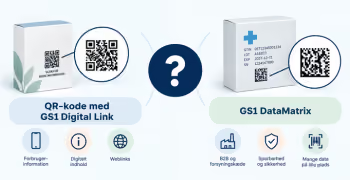
With a 2D barcode, a product's identification can be digitally linked to this information. Therefore, the information does not necessarily need to be encoded directly into the barcode itself.
The same 2D barcode can serve as a gateway to different types of information throughout the product's lifecycle.
A consumer might, for example, need information on use, maintenance, and sorting, while a repair technician might need repair manuals and information about spare parts. Later, a recycling stakeholder need information about materials and recycling.
GS1 Digital Link can support the connection between product identification and relevant digital information sources.
→ Read the guide: What is a resolver - and when do I need one?
“Sustainability” is too broad as a use case. Instead, define the specific purpose for your organization.
For example:
For each data type, you should clarify:
It is particularly important to distinguish between information that must be encoded in the barcode itself and information that the barcode should simply provide digital access to.
In the barcode you can, for example, encode a GTIN, batch number, or serial number.
Digitally, you can, for example, make material documentation, certificates, repair manuals, or information about recycling available.
→ Which information should be in the barcode - and which should be digital?
1. Choose one specific purpose
Start, for example, with repair, sorting, material information, or another specific application.
2. Choose a product group
Start with a limited number of products where the need is clear, so the solution can be tested in practice.
3. Use the product's GTIN as a starting point
The product's GTIN is the starting point for connecting the physical product with the digital information.
4. Map the relevant information and information sources
Find out which information you already have, where it is located, and what might be missing.
5. Clarify who is responsible for the information
Decide who is responsible for creating, verifying, and maintaining the information.
6. Decide what should be encoded in the barcode
If, for example, a GTIN, batch number, or serial number needs to be registered upon scanning, you must decide which information should be encoded.
→ What information should I include in my 2D barcode?
7. Decide what should be available digitally
For example, material documentation, certificates, repair manuals, or sorting instructions.
→ What information should be in the barcode - and what should be available digitally?
8. Create a GS1 Digital Link if digital access is required
→ How to create a GS1 Digital Link
9. Test the solution with the people who will be using it
Test whether users can scan the code and find the information they need. If the solution is intended for consumers, you should, among other things, test different smartphones and ensure that the information works well on mobile. If other stakeholders or systems are to use the solution, they should also be included in the testing.
10. Agree on who will maintain the solution
Clarify who will be responsible for links, information, and any future changes.
If the information does not exist, is not structured, cannot be uniquely linked to the correct product, or if no one is responsible for maintaining it, a 2D barcode will not solve the problem.
Therefore, get your information, sources, and responsibilities in order before building the digital solution.
→ Which information should be in the barcode – and which should be digital?
→ How to create a GS1 Digital Link
→ How to use 2D barcodes for legal requirements and documentation
Do you still need help? Reach out to our support team. We are always ready to help.