|


GTIN
Colloquially, many know GTIN as a barcode, but technically, GTIN is the number found beneath the barcode symbol itself, and can therefore also be used for other technologies such as 2D barcodes and RFID tags.
Colloquially, many know GTIN as a barcode, but technically, GTIN is the number found beneath the barcode symbol itself, and can therefore also be used for other technologies such as 2D barcodes and RFID tags.
Make product documentation digitally accessible
Requirements for product information and documentation are evolving. In several product categories, companies must be able to manage and document an increasing amount of information regarding materials, safety, origin, repair, and the product's lifecycle.
GS1 standards can be helpful by providing unique identification and creating the link between the physical product and digital information. This can be relevant in connection with, for example:
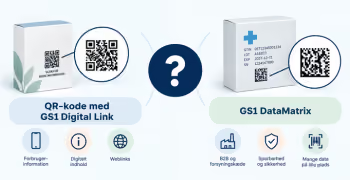
GS1 Digital Link is a technical standard that enables digital access to product information directly via the barcode. The standard itself is not proof that a product meets a specific legal requirement. The company must still determine which specific regulatory requirements apply to the product.
Example: You have a product with GTIN 05712345000120 and a certificate that needs to be digitally accessible. The product's GTIN is encoded in the QR code as part of a GS1 Digital Link with the following structure: https://id.eksempel.dk/01/05712345000120
When the QR code is scanned, the user is directed to the certificate or a product page where the certificate can be found. The barcode does not contain the certificate itself, but rather a link that provides access to the specific certificate.
Digital documentation only creates real value when it can be uniquely linked to the correct product. GS1 identifiers such as GTIN can create this connection.
GTIN is used as a global, unique identifier for trade items. It makes it easier for manufacturers, trading partners, authorities, and consumers to identify the product and exchange information across systems and organizations.
By incorporating a GTIN into a 2D barcode, you can provide access to relevant information without necessarily placing all the data directly into the barcode. It is a flexible and future-proof way to access digital product information.
What information do you need - and where should it be located?
Who needs access?
This could be:
The same product can contain information targeted at several different recipients.
Who owns the information?
Clarify responsibility for:
1. Select product category
Start with products where the need for information is clear.
2. Map requirements and information
What information needs to be available, and for whom?
3. Determine product identification
Ensure the correct GTIN and other possible identifiers.
4. Build the GS1 Digital Link syntax
Clarify which domain and which GS1 Application Identifiers should be included in the link.
5. Set up the technical solution
Decide where the product information will be hosted, which page users should be directed to after scanning the code, and who will be responsible for keeping the information up to date.
If the same barcode on the product needs to provide access to different types of information, a resolver may be relevant. A resolver acts as a digital traffic director, directing users to the relevant content and making it possible to link the product to multiple sources of information.
6. Test access and maintenance
The information should not only be correct at launching day - it has to stay accurate. Therefore, clarify who in the company is responsible for maintaining and updating the solution.
The barcode identifies the product and can carry essential data. The digital solution provides more comprehensive information. It makes it possible to update much of the information without changing the physical packaging.
→ Which information should be encoded in the 2D barcode and which should be stored digitally?
Do you still need help? Reach out to our support team. We are always ready to help.