|


GTIN
Colloquially, many know GTIN as a barcode, but technically, GTIN is the number found beneath the barcode symbol itself, and can therefore also be used for other technologies such as 2D barcodes and RFID tags.
Colloquially, many know GTIN as a barcode, but technically, GTIN is the number found beneath the barcode symbol itself, and can therefore also be used for other technologies such as 2D barcodes and RFID tags.
Moving from a traditional 1D barcode like EAN-13 to a 2D barcode is about more than just changing the barcode on the packaging.
Depending on what you want to use the 2D barcode for, the transition can also affect data, packaging and printing, production equipment, IT systems, and collaboration with your trading partners.
Therefore, it is a good idea to start with your needs and examine the entire process before changing the packaging.
It may be helpful to view this as a business and implementation project.
For example, you might want to:
The purpose influences both the information the barcode needs to contain and which type of 2D barcode you should choose.
- and which should be stored digitally
Ask how the information will be used:
Does a piece of information need to be registered directly in an IT system upon scanning?
Then it may be relevant to encode it in the barcode. This could be a GTIN, batch number, or expiration date, for example.
Does the information primarily need to be accessible to a user and be capable of being changed or updated?
Then it is better stored digitally. This could be a user manual, a certificate, or product information, for example.
→ Read guide: What information should I include in my 2D barcode?
→ Read: What information should be in the barcode – and what should be digital?
The choice depends on how the barcode will be used.
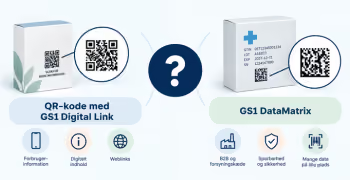
QR code with GS1 Digital Link can be relevant, for example, when the code needs to provide access to digital information via a smartphone.
GS1 DataMatrix can be relevant, for example, when a GTIN, batch number, date, or serial number needs to be registered in processes and IT systems.
Data Matrix with GS1 Digital Link can be relevant when Digital Link is desired, but space is very limited.
→ Read guide: Should I use a QR code with GS1 Digital Link or a GS1 DataMatrix?
If the 2D barcode only contains information that is the same on all copies of the product, the 2D barcode can be pre-printed separately from production.
For example, if the 2D barcode only needs to contain a GTIN (in addition to the web domain), the packaging remains unchanged and the barcode can be pre-printed without involving the production line.
If, on the other hand, it contains information that changes – such as batch number, date, serial number, or weight – the barcode must be able to be generated and printed with the correct information as part of the production process.
Therefore, check, among other things, whether your printing and production equipment can handle this.
It is not enough that the 2D barcode can be scanned. The systems that receive the information must also be able to read and process it correctly.
Therefore, check both your own and relevant trading partners':
The transition to 2D barcodes happens gradually. This means that for a period, you may need both the existing EAN-13 barcode and the new 2D barcode on the packaging.
GS1's global goal is for POS systems to be able to read and process defined GS1 2D barcodes by the end of 2027. This does notmean that EAN-13 will be automatically removed in 2027; the transition will be gradual.
If the product is to be scanned at checkout, you should therefore clarify with your trading partners which 2D barcodes their POS systems can read and process, before the EAN-13 barcode is removed.
→ Read the guide: User guide to 2D barcodes that can be scanned every time
Start with one product or a limited product group before rolling out the solution on a larger scale.
Do not just test whether the barcode can be scanned. Check the entire process - from printing and scanning to the registration and processing of information in relevant systems.
If trading partners need to be able to use the 2D barcode, they should also be included in the testing.
Do you still need help? Reach out to our support team. We are always ready to help.