|


GTIN
Colloquially, many know GTIN as a barcode, but technically, GTIN is the number found beneath the barcode symbol itself, and can therefore also be used for other technologies such as 2D barcodes and RFID tags.
Colloquially, many know GTIN as a barcode, but technically, GTIN is the number found beneath the barcode symbol itself, and can therefore also be used for other technologies such as 2D barcodes and RFID tags.
A traditional EAN-13 barcode contains the product's GTIN.
A 2D barcode can also contain information such as:
This means that more information about the specific item can be captured in a single scan.
For example, this allows systems to record the date or batch number directly upon scanning, rather than having to handle the information manually.
Examples include:
Date management
If the date is encoded in the barcode, it can be captured by scanning. This can be used, for example, to manage items based on shelf life or to support the reduction of food waste.
Recalls
If the batch/lot number is encoded, it makes it possible to identify and handle affected production batches more precisely.
Traceability
Information such as batch or serial numbers can be recorded when the product is scanned at various points in the supply chain, thereby supporting traceability.
Inventory and goods receipt
Multiple pieces of information can be recorded in a single scan. For example, GTIN and batch number or date can be captured simultaneously.
POS (the store's checkout system)
A 2D barcode can also be used at checkout if the store's POS system can read and process the information contained in the code.
Start by asking: Which process do we want to improve?
This could be, for example:
Only then should you decide what information the barcode needs to contain and which type of 2D barcode suits your needs.
1. Choose the process you want to improve
Start with one specific challenge – such as date management, goods receipt, or traceability – rather than implementing 2D barcodes without a clear purpose.
2. Select a relevant product category
Start, for example, with products where date, batch, high volume, or specific traceability requirements make the 2D barcode relevant.
3. Define which data should be encoded in the barcode
Decide which information needs to be captured upon scanning. This could be, for example, GTIN, batch number, expiration date, and/or serial number.
GS1 Application Identifiers (AIs) tell the scanner and the underlying system what type of information follows. For example, (17)indicates that the following digits are an expiration date.
For example:
→ Read: What information should I include in my 2D barcode?
4. Check if your systems and equipment are ready
It is not enough that the barcode can be scanned. The systems receiving the information must also be able to read and process it correctly.
Therefore, check if your relevant:
can handle the chosen 2D barcode and the information it contains.
5. Test the entire process from scanning to system
Test the barcode in the situation where it will actually be used. Verify both that it can be scanned and that the encoded information is registered and processed correctly in the receiving system.
If the barcode is to be used across multiple companies, relevant trading partners should also be included in the test.
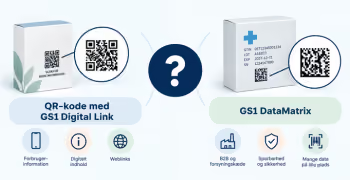
If the need is exclusively for operational data capture, GS1 DataMatrix may be relevant.
If the product also needs to provide access to digital information via standard smartphones, QR code with GS1 Digital Link may be relevant.
Please note that if the product also needs to be scanned at POS, it may be necessary to also include a parallel EAN-13 barcode. Check with your partners to see what the options are.
→ Should I use a QR code with GS1 Digital Link or a GS1 DataMatrix?
→ How to transition from a 1D barcode to a 2D barcode
Do you still need help? Reach out to our support team. We are always ready to help.