Colloquially, many know GTIN as a barcode, but technically, GTIN is the number found beneath the barcode symbol itself, and can therefore also be used for other technologies such as 2D barcodes and RFID tags.
When creating product data in GS1Trade Sync, you must fill in the field ”1715 Collective Scheme“. The field is mandatory for base units from 16 May 2026, an can be filled in at all levels of the product hierarchy (base unit - case - pallet).
If you are not the responsible party reporting to a Danish collective scheme, you may select “Not responsible” from the code list.

If the product is exempt, you must instead select “Yes” in the field “1704 Is the packaging exempt from a collective scheme?”.

We guide you step by step on how to assign a collective scheme to multiple products in GS1Trade Sync using Excel.
The function can be used for up to 1,000 base units at a time, provided data does not contain errors.
1. Enter a collective scheme for at least one base unit
Under the “Packaging” tab, complete the field “1715 Collective Scheme.”
Save as draft.

2. Filter on base units
In "Advanced search" - “Add/Remove Search Filters” - select “Unit Description” and filter on Base unit.

3. Select report type
From the “Reports” dropdown, choose Complete or selected data set (Excel).

4. Configure the report
When creating the report, under “All or selected fields?” choose All fields.

5. Download the report
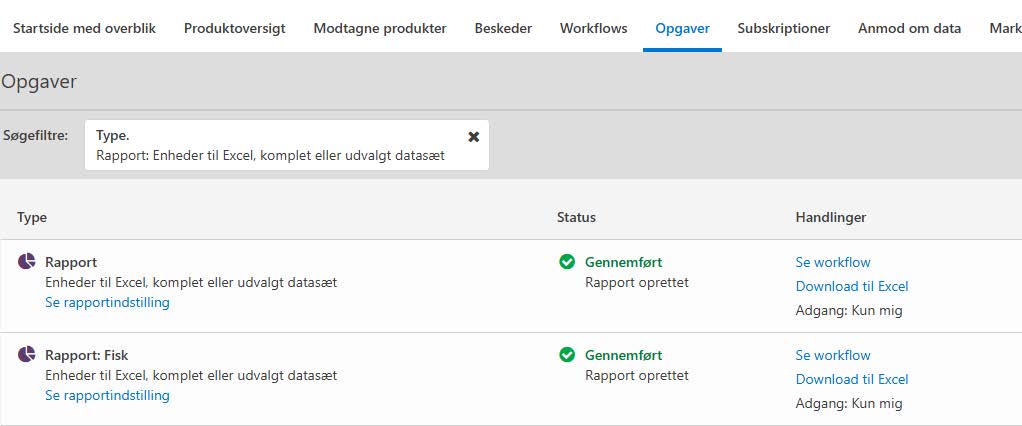
Go to the “Tasks” tab and wait until the report is ready.
In the "Actions" column select Download to Excel.
6. Fill in the collective scheme in the Excel file
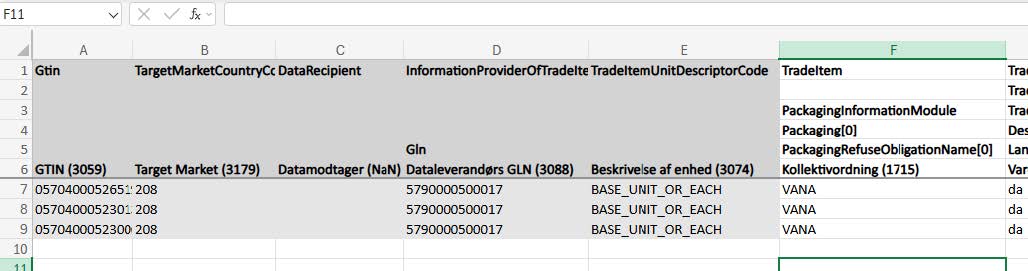
Find the “TradeItem - Packaging Information” tab in the Excel sheet, where the column “Collective scheme (1715)” appears.
Fill in the column for all rows.
Save the Excel file.
7. Import the file in GS1Trade Sync
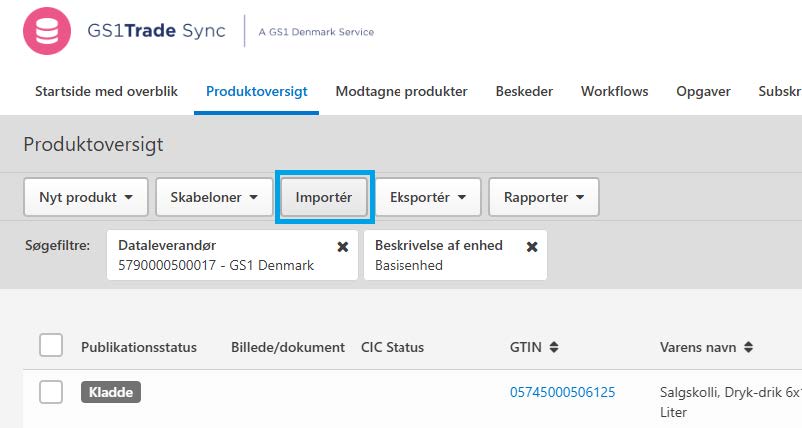
Go to the “Product overview” tab and click Import.
Upload the edited file from your computer.
Under “What should happen to your products after uploading the Excel file?” select Publish immediately and import.
8. Check the status of the upload in the “Tasks” tab.
When completed, the information is uploaded and updated in Trade Sync.
If some products contain other errors, they will not be published, but will instead remain as drafts in the product overview. You can download a list of products and their errors or correct them directly in the product overview.
A collective scheme is an organisation that carries out producers' legal responsibility for the collection, sorting and recycling of packaging, electronics or batteries.
These schemes are part of the Extended Producer Responsibility (EPR), which requires producers and importers to take responsibility for the entire lifecycle of a product - including when it turns into waste.
By specifying the collective scheme directly in GS1Trade Sync, you ensure that it is visible for your trading partners how your company complies with producer responsibility regulations.

GS1Trade Image provides professional marketing and planogram images that meet retailers' requirements and imaging guidelines.
If you want to create your own product photos, we can also help you get certified.

GS1Trade Sync is a data pool for product data exchange that your trading partners can access.
GS1Trade Sync streamlines data exchange between trading partners because data only needs to be entered in one place. This increases the quality of product data and creates value for you - and the entire value chain.

GS1Trade Packaging is a packaging data system that gathers your packaging data in one place. The system ensures efficient collection, structuring, and declaration of packaging data, and makes it easy to exchange packaging data with other companies.

GS1Trade Exact ensures the quality of your product data. All physical products are checked against the data registered in GS1Trade Sync.
With this service, you get verified and quality-assured data that benefits the entire supply chain.

GS1Trade Transact handles the digital receipt of orders and the sending of documents to your customers. You can choose whether to integrate it with your financial system or access it online.

GTIN (also known as EAN) stands for “Global Trade Item Number” and is the number sequence shown beneath a barcode symbol.
GTIN (EAN) is a global standard used to uniquely identify digital and physical products, allowing the barcode to be scanned anywhere in the world throughout the supply chain.

A GLN (also known as EAN) allows you to uniquely identify physical, functional, legal, or digital entities. This can include the sender, receiver, buyer, seller, supplier, manufacturer, delivery location, billing location, store, or internal departments.