|


GTIN
Colloquially, many know GTIN as a barcode, but technically, GTIN is the number found beneath the barcode symbol itself, and can therefore also be used for other technologies such as 2D barcodes and RFID tags.
Colloquially, many know GTIN as a barcode, but technically, GTIN is the number found beneath the barcode symbol itself, and can therefore also be used for other technologies such as 2D barcodes and RFID tags.
A simple step-by-step guide on how to create barcode numbers for your variable-weight sales units and case units, as well as how to register the product in GS1Trade Sync.
Sales unit: Use an RCN-13 number, expressed in an EAN-13 barcode.
Case unit: Use a GTIN-14 starting with 9. This is typically expressed in a GS1-128 barcode.
When a product varies in weight from unit to unit, the weight can be encoded directly into the barcode. For this, you use an RCN-13 number (Restricted Circulation Number) – also known as a variable-weight barcode number.
To generate RCN-13 numbers, you must first obtain a specific variable-weight prefix from GS1 Denmark. Order the prefix via our manual order form.
Please specify in your order how many products you need variable-weight barcodes for. One prefix allows you to create variable-weight barcodes for 10 products.
Please note:
Click here to calculate your check digit.
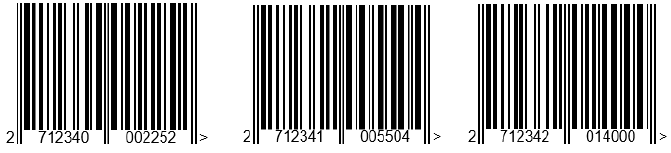
Ground beef - 225 g
271234 · 0 · 00225 · 2
Company prefix · Product · Weight · Check digit
Ribeye - 560 g
271234 · 1 · 00560 · 3
Company prefix · Product · Weight · Check digit
Beef tenderloin - 1.4 kg
271234 · 2 · 01400 · 0
Company prefix · Product · Weight · Check digit
Once you have generated the RCN-13 number, it must be expressed as an EAN-13 barcode.
When scanned at the point of sale (POS), the price is calculated based on the price per kilo registered in the POS system and the weight encoded in the barcode.
The EAN-13 barcode is typically generated at the same time the product is weighed. This can be done, for example, on a scale with a built-in label printer, where the variable-weight prefix and product reference number are registered.
A case unit containing variable-weight products must not have an RCN-13 number, as the case is not intended to be scanned at checkout (POS).
The shipping unit must instead have a GTIN-14, where the first digit is 9.
Use your standard GS1 company prefix to create the number:
See examples below:
Once you have created the GTIN-14 for the shipping unit, the number must be expressed in a GS1-128 barcode.
The barcode will typically contain:
AI (01): GTIN
AI (10): Batch/lot number
AI (310n): Net weight in kg, indicated by six digits. The fourth digit (n) indicates the number of decimal places.
Example:
(3100) 000035 = 35 kg
(3103) 000035 = 0.035 kg

When creating the variable-weight sales unit in GS1Trade Sync, do not enter the specific RCN-13 number from one particular package. The weight varies from package to package.
Instead, use the company prefix and the product reference number, and replace the five digits for weight with 00000. Then, calculate a new check digit.
The procedure is therefore:
The table below shows the difference between the number in the barcode and the number to be used in GS1Trade Sync.
When creating the product:


Do you still need help? Reach out to our support team. We are always ready to help.