|


GTIN
Colloquially, many know GTIN as a barcode, but technically, GTIN is the number found beneath the barcode symbol itself, and can therefore also be used for other technologies such as 2D barcodes and RFID tags.
Colloquially, many know GTIN as a barcode, but technically, GTIN is the number found beneath the barcode symbol itself, and can therefore also be used for other technologies such as 2D barcodes and RFID tags.
How do you get the most reliable, scannable barcodes on your sales units? Read this guide to learn which requirements you need to meet to ensure your products can be scanned quickly and accurately at the checkout.
This guide covers the EAN-13 barcode, the barcode found on most retail products, as well as the EAN-8 barcode, which is used only on small products.
Barcodes can be created using a variety of software solutions, including our GS1Trade Activate service, which makes it easy to create compliant barcodes for your products. Barcodes can be printed either directly on the packaging or on labels that are then placed on the products.
A barcode contains a GTIN (Global Trade Item Number), which is the number below the barcode. If you want more information about GTIN, please read the following guide on how to assign GTINs.

To ensure reliable scanning at the checkout, your barcode must meet the requirements with regards to:
Choose the right size for the barcode, as well as the quiet zone.
EAN barcodes can be printed in different sizes. Barcode dimensions are based on a nominal size, referred to as a magnification factor of 1.0 (100%).
EAN barcodes must be printed with a magnification factor between 0.8 (80%) and 2.0 (200%).
In addition, all EAN barcodes must have a quiet zone (clear margin) on both sides to ensure they can be scanned.

The table below shows examples of EAN-13 and EAN-8 barcode dimensions in millimetres for different magnification factors.
You can find a more comprehensive overview of barcode sizes in our guide: How big should EAN-13 and EAN-8 be.
* The width measurements include the quiet zones. The height measurements indicate the minimum bar height and exclude the digits below the barcode.
It is important to maintain the barcode's proportions when reducing its size. Truncating the barcode (reducing its height) makes scanning at the checkout less reliable.
However, if the available space on the product does not allow for a full-height barcode, we recommend truncating the barcode rather than reducing its width.

Poor barcode placement can make scanning more difficult. Follow the guidelines below to ensure that your product can be scanned efficiently at retail checkouts, regardless of the shape of its packaging.
The following placement is recommended (in order of priority):

The barcode must be positioned at least 8 mm and no more than 100 mm from any edge of the package. If it is placed too close to an edge, it can easily become damaged and may no longer be scannable. If it is positioned too far from an edge, fixed scanners may not be able to detect it, meaning it can only be scanned with a handheld scanner.
In the following example, the scanner cannot read the barcode on the right because of its placement.

The printing process and the curvature of the product determine whether the barcode should be printed in ladder or picket fence orientation. Whenever the printing process and product shape allow, we recommend using picket fence orientation. However, on round or very small products with a diameter of less than 5 cm, the barcode should be printed in ladder orientation. This ensures that the entire barcode is visible to the scanner.

Ladder orientation: On products with a diameter of less than 5 cm

Picket fence orientation: On products with a diameter of more than 5 cm
Anything that obscures or damages the barcode may affect its readability and should be avoided. Examples include:
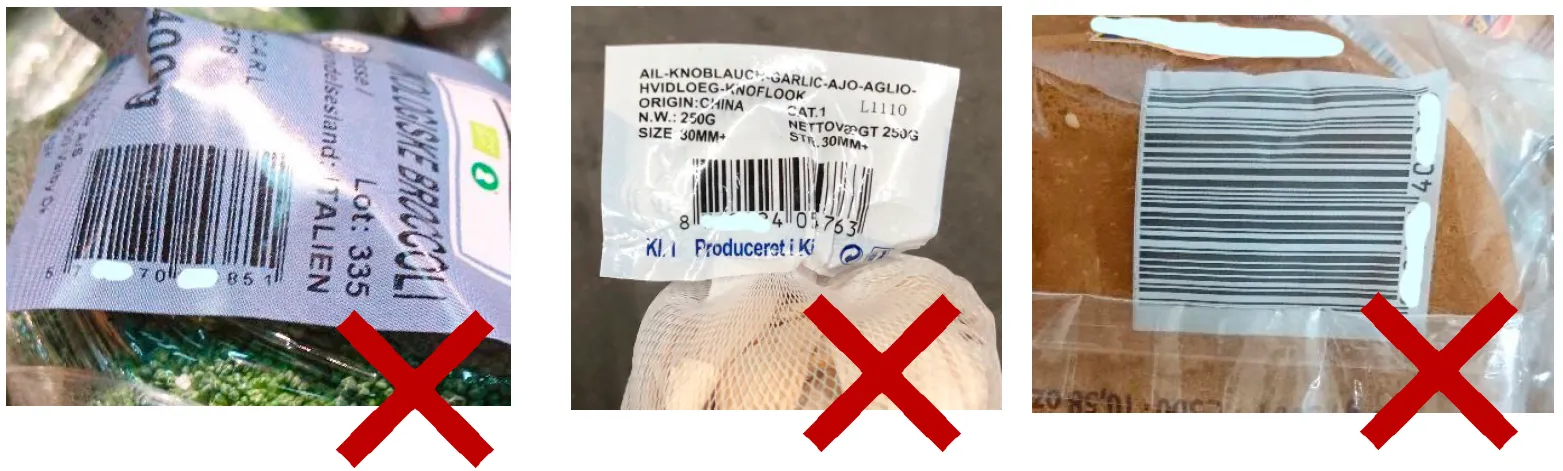
There must be at least one visible barcode on the product containing the product's GTIN. If the product is large (more than 450 mm in two dimensions: height, width or length) or heavy (more than 13 kg), it is a good idea to use two or more barcodes.
The barcode must be printed at a high quality to ensure reliable scanning at checkout.
It is important that the barcode is printed in high quality on a print-resistant material that prevents the ink from smudging. The bars must be clear and straight against a light background, with no ink spread or gaps.
It is recommended that barcodes are tested with a verifier following ISO/IEC15416. The ISO quality rating must be at least 1.5.
We also recommend that you check your printer regularly, as blurry barcodes can occur if the printer is not cleaned regularly.

Scanners use red light to read barcodes, so not all colour combinations can be scanned. The scanner relies on contrast between the dark bars and the light background. Black bars on a white background are the easiest for scanners to detect, but other colour combinations may also work.
The figure below illustrates some colour combinations that scanners can read — and some combinations that you should avoid.
We recommend testing whether the barcode can be scanned before production starts.

Do you know the three most common barcode errors we see among our members? Watch this short video to learn what they are and how to avoid them.
Do you still need help? Reach out to our support team. We are always ready to help.